
Installing Backtrack 4 on USB
Backtrack has been discontinued and replaced by Kali Linux. This content is preserved for historical reference only.
Before we begin, I must say that everything that got me into penetration testing is due to Backtrack. When I first used Backtrack, the latest version was Backtrack 3 USB version. Now the latest version is Backtrack 4 R2.
Backtrack is a Linux security distribution that contains a vast amount of tools to test to see if your system is secure. This operating system can be your main operating system or can be made live to boot anywhere you want.
Note: The original download link pointed to backtrack-linux.org which now redirects to Kali Linux, Backtrack’s successor.
I have Backtrack 4 R2 ISO Image on my flashdrive. In order for you to install a portable version of Backtrack, you will need a minimum 2GB USB flashdrive, Backtrack ISO image, and Unetbootin (download at http://unetbootin.github.io/). Backtrack is about the size of 2GB and might take a while to download. But once you have all three things, we can install Backtrack onto the USB flashdrive.
Installing Backtrack Live USB
- Plug your USB flashdrive into the computer
- Format the USB flashdrive to FAT32
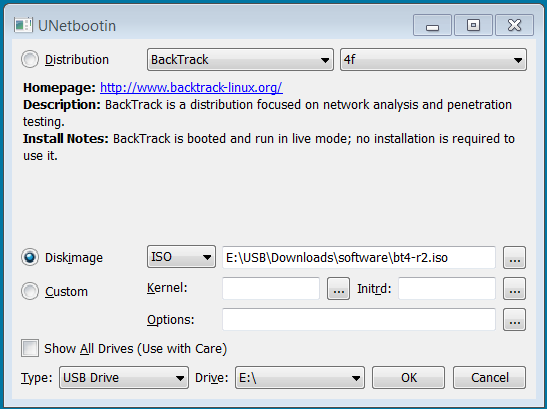
- Open Unetbootin
- Select the diskimage button and click the “…” to browse for the bt4-r2.iso
- Select your USB drive and press OK
(Note: The installation might take a while and it might seem like it may be stuck at one point but make sure you leave it alone. Mine got stuck around 80% and it took around ten minutes to move on.)
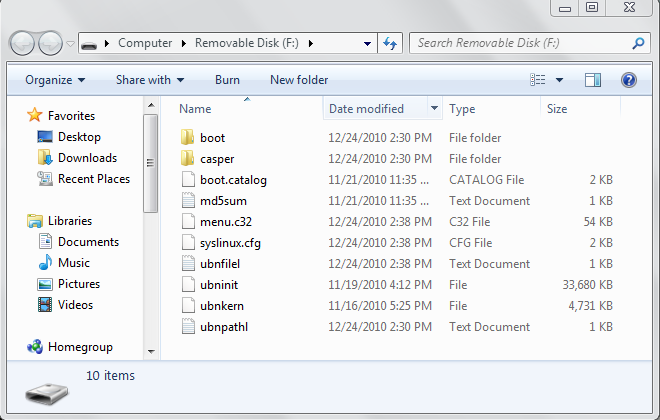
Once you finished installing Backtrack, your USB flashdrive files should look like this:
Now you have completed the installation of Backtrack 4 onto your USB flashdrive. Now we try to boot the operating system (OS) and see if we have successfully installed BT4 (Backtrack 4).